PRODUCT DESIGN / USER RESEARCH / HUD DESIGN / MOTION GRAPHICS
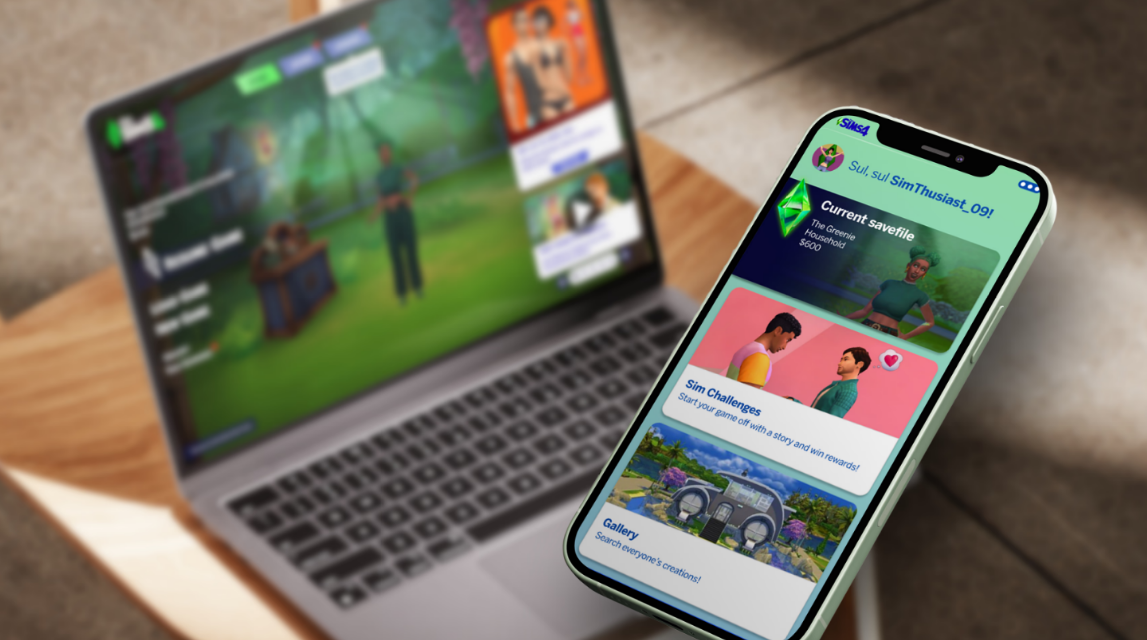
A companion app, for the organized Simmer
Designing a companion app to the Sims 4, for organization and tracking.
About the project
Role UX/UI designer
Duration Aug 2025
Deliverables Interactive wireframes
Note: The Sims 4™ is a product of Maxis and Electronic Arts. This design is purely an extension of the existing game.
The context
The Sims 4 is a life-simulating game with different content and playing styles. I designed this companion app to support the Simmer who likes to organize their game, keeps track of challenges, and reports any bug they come across.
This companion app is to be used alongside the Sims 4 PC game, and tracks the player's game and current save file in real-time.
The problem statement
Why it matters
Players who enjoy complex challenges or long-term saves often struggle to track their progress and report bugs efficiently, as switching between gameplay and external tools interrupts immersion and limits their overall experience. These dedicated players form the core of The Sims 4 community, driving feedback, creating new playstyles, and helping sustain the game over time. Supporting them ultimately strengthens the game’s longevity.
What features do the players actually need?
Deciding the content of the app
To find out the core problem of the target audience, I searched through Sims 4 forums and social platforms, and I looked at myself as a Simmer. What came up the most were questions about bugs, and the players asking about new features for the game. Common bugs that came up were those from Simmers with large save files, who are religious about their in-game Sims and goals. The main need was a seamless way to track, share, and troubleshoot gameplay without leaving the game.
I condensed my research into three user statements, as a base for the main features of the app.
Save File Tracking
“As an avid Sims player who likes to play with multiple generations of Sims, I’d like to be able to see what Sims are part of the family tree, so I can both reminisce on past Sims and see how the current family is doing right now.”
Bug Reports
“As a Simmer who spends a lot of time in the game playing around with cheats and tools, I’d like to be able to easily report bugs or view solutions to them, so I can ensure bugs will be solved in the future.”
Sim Challenges
“As a Simmer who likes to add some difficulty to their gameplay, I’d like to be able to see what challenges exist, what the rules of those challenges are, and what my progress is, so I can keep track of my gameplay.”
This information I then condensed into an Information Architecture. This way I could understand the content of the app and the flow over all the features. This eventually helped me design the user flow.
Designing the starting point of the app
The landing page
I had the most trouble with desinging the landing page. I wanted it to fit the current style of the main menu of the PC game, but fit within a mobile screen, and with the necessary content. Designing it in a similar style as the game made sure the players had an easier time navigating, and would help with not breaking the player immersion when switching between the game and the companion app.
From top to bottom: Version 1 until 3.
Makes makes The Sims 4 look like The Sims 4?
The visual style
The third version of the landing page eventually helped me design the rest of the app too. I was inspired by the UI of the game, both in the shell menus as well as the in-game UI. I collected personal screenshots of UI relevant to the content of the companion app, such as the Simology panel, Scenario’s and Events, the Gallery, and the Sims 4 Bug Reports Forum Page.
The typography and colors were collected from both the game and Bug Reports Forum as well, and add to the immersion of the app.
An interactive prototype
The final product
For the final product I made high-fidelity prototypes of the landing page, and the three main features: The current savefiles, a Bug Reports page, and Sim Challenges and Scenarios. Note: Click on the image of the Landing Page to view the working prototype - no logging in required!
What did I learn during the process?
Reflection
What went well?
With this being one of my first game UI designs, I had a really fun time. I enjoyed the process of designing the content for the companion app, and looking at the final prototype made me feel really accomplished. I think that part went the best as well, with my eye for detail I had an easier time making the app visually look like it belongs as a companion to the game.
What could go better?
I noticed that I immediately wanted to go into the design phase, and had a hard time properly researching. If I’d interviewed other Sims players or observed their behaviour, I would’ve been able to design a much more tailored companion app. I’m not dissatisfied with the final project, but I know that if I’d been more thorough during each step, I could’ve created an even more ellaborate and fitting design.

PRODUCT DESIGN / USER RESEARCH / HUD DESIGN / MOTION GRAPHICS
A companion app, for the organized Simmer
Designing a companion app to the Sims 4, for organization and tracking.
About the project
Role UX/UI designer
Duration Aug 2025
Deliverables Interactive wireframes
Note: The Sims 4™ is a product of Maxis and Electronic Arts. This design is purely an extension of the existing game.
The context
The Sims 4 is a life-simulating game with different content and playing styles. I designed this companion app to support the Simmer who likes to organize their game, keeps track of challenges, and reports any bug they come across.
This companion app is to be used alongside the Sims 4 PC game, and tracks the player's game and current save file in real-time.
The problem statement
Why it matters
Players who enjoy complex challenges or long-term saves often struggle to track their progress and report bugs efficiently, as switching between gameplay and external tools interrupts immersion and limits their overall experience. These dedicated players form the core of The Sims 4 community, driving feedback, creating new playstyles, and helping sustain the game over time. Supporting them ultimately strengthens the game’s longevity.
What features do the players actually need?
Deciding the content of the app
To find out the core problem of the target audience, I searched through Sims 4 forums and social platforms, and I looked at myself as a Simmer. What came up the most were questions about bugs, and the players asking about new features for the game. Common bugs that came up were those from Simmers with large save files, who are religious about their in-game Sims and goals. The main need was a seamless way to track, share, and troubleshoot gameplay without leaving the game.
I condensed my research into three user statements, as a base for the main features of the app.
Save File Tracking
“As an avid Sims player who likes to play with multiple generations of Sims, I’d like to be able to see what Sims are part of the family tree, so I can both reminisce on past Sims and see how the current family is doing right now.”
Bug Reports
“As a Simmer who spends a lot of time in the game playing around with cheats and tools, I’d like to be able to easily report bugs or view solutions to them, so I can ensure bugs will be solved in the future.”
Sim Challenges
“As a Simmer who likes to add some difficulty to their gameplay, I’d like to be able to see what challenges exist, what the rules of those challenges are, and what my progress is, so I can keep track of my gameplay.”
This information I then condensed into an Information Architecture. This way I could understand the content of the app and the flow over all the features. This eventually helped me design the user flow.
Designing the starting point of the app
The landing page
I had the most trouble with desinging the landing page. I wanted it to fit the current style of the main menu of the PC game, but fit within a mobile screen, and with the necessary content. Designing it in a similar style as the game made sure the players had an easier time navigating, and would help with not breaking the player immersion when switching between the game and the companion app.
From left to right: Version 1 until 3.
Makes makes The Sims 4 look like The Sims 4?
The visual style
The third version of the landing page eventually helped me design the rest of the app too. I was inspired by the UI of the game, both in the shell menus as well as the in-game UI. I collected personal screenshots of UI relevant to the content of the companion app, such as the Simology panel, Scenario’s and Events, the Gallery, and the Sims 4 Bug Reports Forum Page.
The typography and colors were collected from both the game and Bug Reports Forum as well, and add to the immersion of the app.
An interactive prototype
The final product
For the final product I made high-fidelity prototypes of the landing page, and the three main features: The current savefiles, a Bug Reports page, and Sim Challenges and Scenarios. Note: Click on the image of the Landing Page to view the working prototype - no logging in required!
What did I learn during the process?
Reflection
What went well?
With this being one of my first game UI designs, I had a really fun time. I enjoyed the process of designing the content for the companion app, and looking at the final prototype made me feel really accomplished. I think that part went the best as well, with my eye for detail I had an easier time making the app visually look like it belongs as a companion to the game.
What could go better?
I noticed that I immediately wanted to go into the design phase, and had a hard time properly researching. If I’d interviewed other Sims players or observed their behaviour, I would’ve been able to design a much more tailored companion app. I’m not dissatisfied with the final project, but I know that if I’d been more thorough during each step, I could’ve created an even more ellaborate and fitting design.